
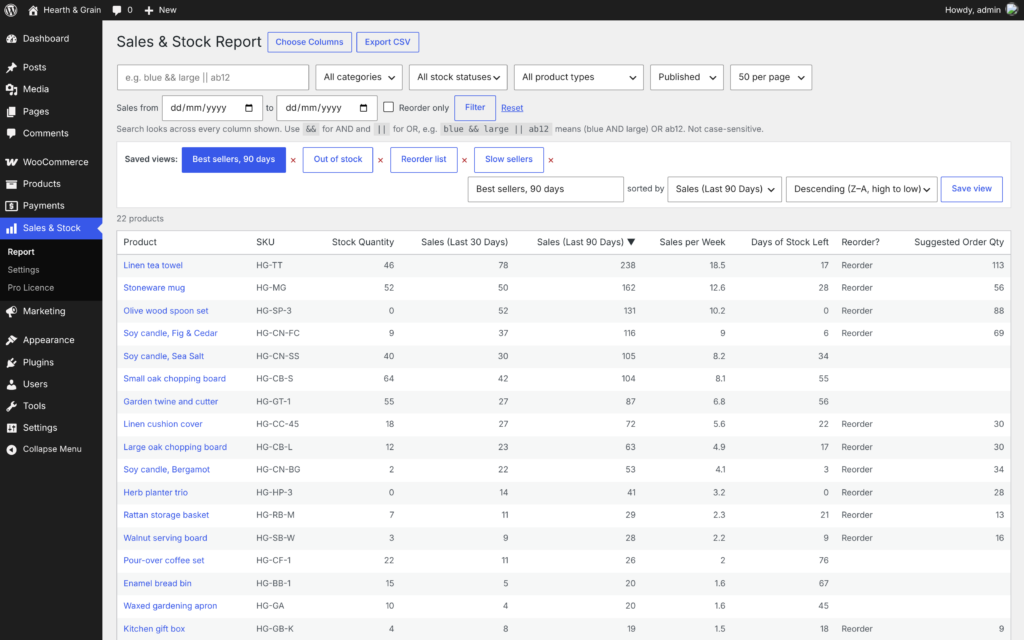
Know what’s selling, what’s running low, and what to reorder.
Sales & Stock Report puts every product’s stock and sales side by side, in one fast table you can sort, search and export. Pro works out how long your stock will last, flags what to reorder, and emails you the week’s sales.
For WooCommerce shops.
Two questions every shop needs answering. WooCommerce answers them in different places.
1. What’s actually selling? WooCommerce Analytics will tell you, product by product. But it won’t tell you how many you’ve got left.
2. What’s about to run out? Your products screen shows stock, but not how fast it’s going. Twelve in stock looks fine, until you realise you sell three a day.
By the time a best seller says Out of stock, it’s too late to reorder.
Free plugin
Sales and stock in one table. Free.
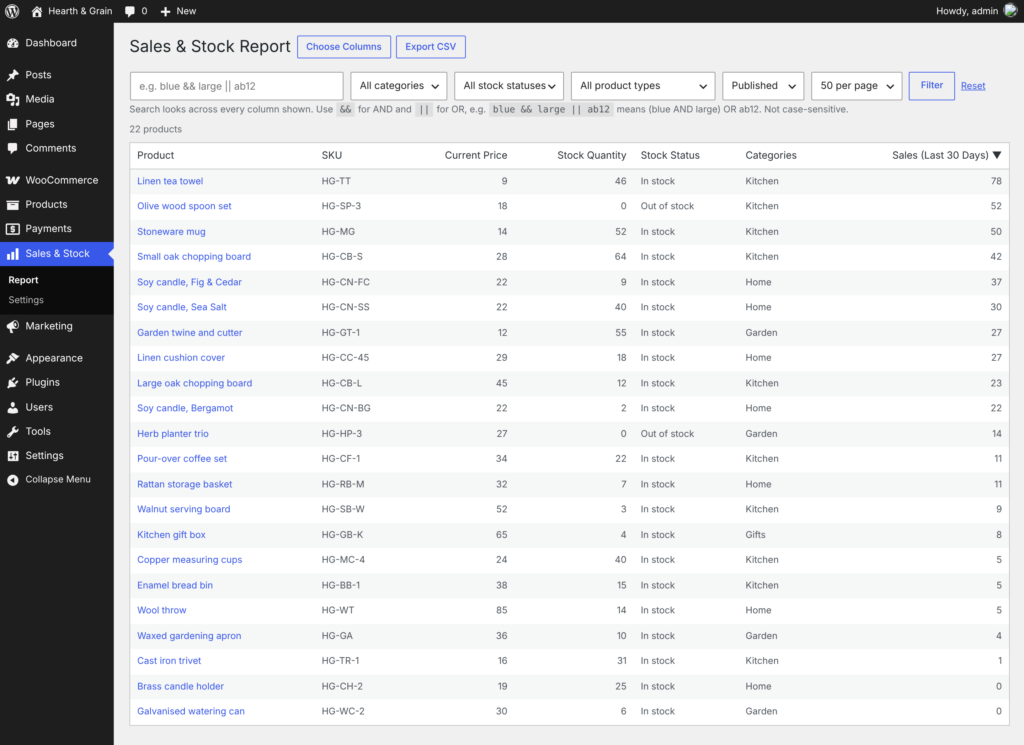
One report under Sales & Stock in your WordPress admin. It reads your products and WooCommerce Analytics, and never changes anything, so it’s safe to hand to anyone who needs the numbers.

Your columns
SKU, prices, stock, shipping class, categories, dates: pick any of the standard product fields.

Last 30 days’ sales
Units sold for every product, straight from WooCommerce Analytics.

Stock that adds up
Variable products show the total stock across all their variations.

Sort and search everything
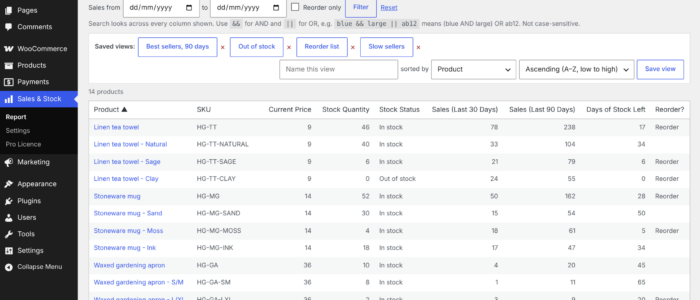
Sort by any column. Search every column at once, with && for AND and || for OR.

Filters
Category, stock status, product type and status.

CSV export
Exactly what’s on screen, ready for Excel or Google Sheets.
PRO Plugin
Pro: know what to reorder, and when
Pro works out how fast each product is selling, how long your stock will last and how many to order, then puts it in your inbox so nobody has to remember to look.
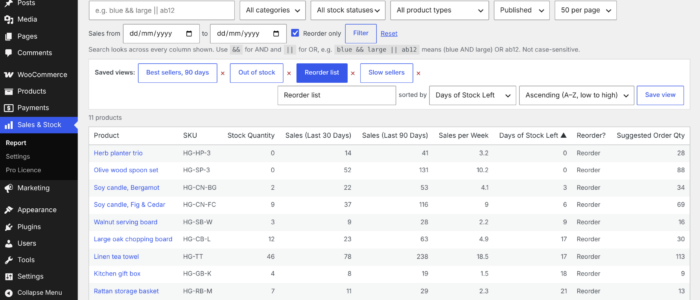 Your reorder list, most urgent first

Reorder list
Sales per week, days of stock left, a reorder flag and how many to order, for every product. Tick Reorder only and the report becomes your shopping list, most urgent first.

Sales summary by email
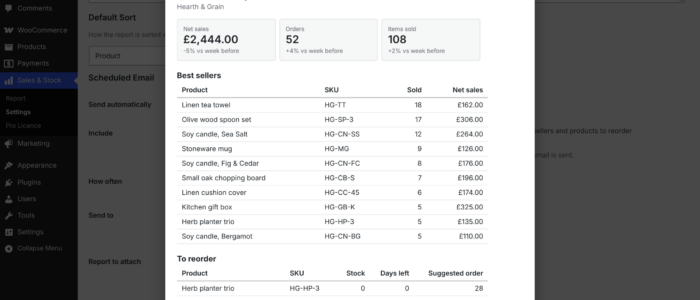
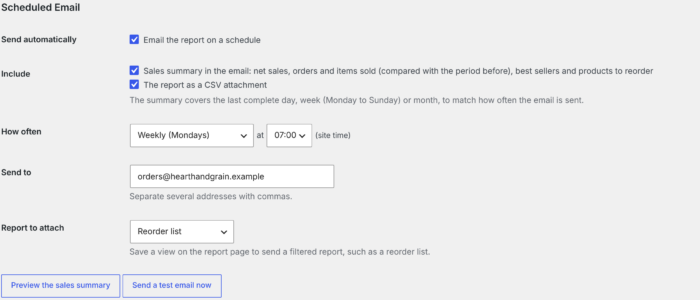
Daily, weekly or monthly: net sales, orders and items sold against the period before, your best sellers, and what to reorder. Attach the full report as a CSV if you like.

Saved views
“Reorder list”, “Slow sellers this year”, “Out of stock”: any mix of filters, dates and sort, one click away. Set the sort the report opens with.

Any sales period
Units sold over 7 days, 90 days, 6 or 12 months, 2 years, this year, or any dates you pick.

Variations as rows
See each size or colour on its own row, under its parent or on its own, with its own stock and sales.

Your own columns
Product attributes, Advanced Custom Fields (ACF) and any custom field, such as a supplier code.
Worked Example
How twenty four in stock becomes out of stock
(Illustrative: made-up shop, made-up numbers, the real calculation.)
- Sold in the last 90 days: 90, so on average 1 per day
- In stock: 24 in stock, so 24 days left
- Supplier lead time: 30 days, so it is flagged to run out approx. 6 days before new order arrives
- Order enough for: 30 days after delivery
What happens: At roughly one per day, 24 items last 24 days. Your supplier takes 30. Order today and you’re still out of stock for six days. Wait until it says Out of stock, and you’re out for a month.
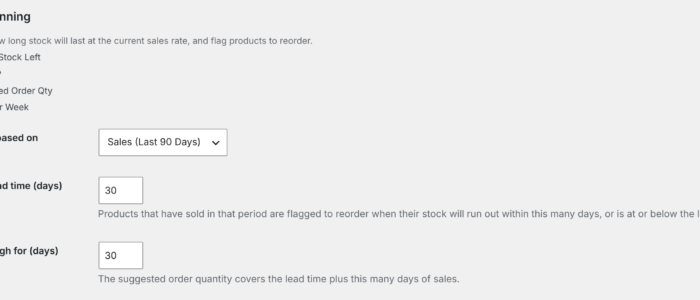
What Pro shows: 24 days of stock left, flagged to reorder because that’s less than the 30-day lead time, and a suggested order of 36: enough for the 30 days’ delivery plus 30 days after it arrives, less the 24 you’ve got in stock.
And in your inbox: Monday’s sales summary lists it under To reorder, most urgent first, alongside your best sellers and how the week compared with the one before.
Products that haven’t sold in the period aren’t flagged, so discontinued lines sitting at zero don’t clutter the list.
Pricing
Free vs Pro
Start free. Add Pro when you want to know what to reorder, and when.
Comparison table
| Free | Pro | |
|---|---|---|
| Choose columns from every standard product field | ✓ | ✓ |
| Sort, search and filter | ✓ | ✓ |
| CSV export | ✓ | ✓ |
| Units sold, last 30 days | ✓ | ✓ |
| Total stock for variable products | ✓ | ✓ |
| Units sold over 7 days to 2 years, this year, or any dates | ✓ | |
| Days of stock left and sales per week | ✓ | |
| Reorder flags and suggested order quantities | ✓ | |
| Sales summary email, daily, weekly or monthly | ✓ | |
| Scheduled CSV email | ✓ | |
| Saved views and default sort | ✓ | |
| Variations as rows | ✓ | |
| Attribute, ACF and custom field columns | ✓ | |
| Email support | ✓ |
Pricing
| Plan | Sites | Price per year |
|---|---|---|
| Single site | 1 | $59.99 |
| Small agency | 5 | $129.99 |
| Agency | 20 | $249.99 |
Prices include updates and support for a year. Pro keeps working if you don’t renew. 14-day money-back guarantee. Secure checkout by Freemius; VAT handled for you.
FAQ
No. The report only reads your data. To change a product, click its name and it opens in WooCommerce as usual.
From WooCommerce Analytics, which WooCommerce keeps up to date as orders come in. Completed and Processing orders count, and variation sales are added to their parent product. If sales show as zero, check that Analytics has imported your older orders (WooCommerce > Settings > Advanced > Analytics).
No. The report only runs when you open it in your WordPress admin, never for customers, and it loads products in batches so big catalogues stay quick.
From how fast each product sold over the period you choose: 30 days, 90 days, 6 or 12 months. A product is flagged when it’ll run out within your supplier’s lead time, or its stock is at or below its low stock threshold. The suggested quantity covers the lead time plus however many days of sales you want to order for.
WooCommerce, with Analytics switched on for sales figures. Pro is an add-on, so install the free plugin first.
No. It’s an independent plugin, built by a UK developer to answer “what do I need to reorder?” on real client shops.
Pro keeps working. You stop getting updates and support until you renew.
Usually not. Staging, development and local copies don’t count towards your site limit when their address shows what they are, such as staging.yourshop.co.uk or yourshop.local. If yours isn’t picked up, email and we’ll sort it.
The free plugin shows you how the report works. If Pro isn’t right for your shop, email within 14 days for a full refund.
See what’s really selling, and what’s about to run out.
Install the free plugin in two minutes. Add Pro when you want the reorder list in your inbox.
WooCommerce is a trademark of Automattic Inc. Tivy Product Sales & Stock Report is an independent plugin and is not affiliated with or endorsed by WooCommerce or Automattic.