
Your web orders in Sage. Your Sage stock on the web.
Tivy Connector is the WooCommerce end of Adept’s Line 50 web interface. The free plugin keeps your shop’s stock levels in step with Sage 50. Pro sends your web orders and new customers into Sage, and brings your Sage prices, VAT and product rules onto your shop.
For WooCommerce shops running Sage 50 Accounts with Adept Tools XML.
Sage knows your stock and prices. Your website takes the orders. Keeping the two in step shouldn’t be anybody’s job.
1. Orders typed in twice. Every web order re-keyed into Sage: names, addresses, lines, carriage, discounts. It’s slow, and one wrong digit means a wrong invoice.
2. Stock and prices that drift. Sage says you’ve sold out; the website still says twelve in stock. A price changes in Sage and nobody remembers to change it on the shop.
Adept’s Line 50 interface moves the data. Tivy Connector makes sure WooCommerce does the right thing with it.
Free plugin
Your Sage stock levels on your shop. Free.
Install it, paste one address into the Adept client, tick Stock Level Upload. From then on, when stock changes in Sage, it changes on your website. It touches stock and nothing else.

Stock levels from Sage
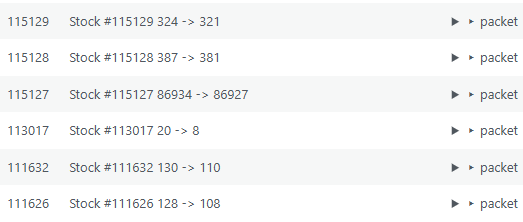
Every stock update from Sage changes the quantity on your WooCommerce product or variation.

Matched by SKU
Sage stock code = WooCommerce SKU. Products are never created or deleted; unknown codes are logged, not guessed.

Stock status that behaves
In stock, out of stock and backorders follow your WooCommerce settings, and low-stock emails work as normal.

Locked down
Only the Adept client can talk to it: a private access key, and optionally the IP address of the PC running Sage.

Dry-run for testing
Point Adept’s test tool at the dry-run address and see exactly what would change, without changing anything.

A log you can read
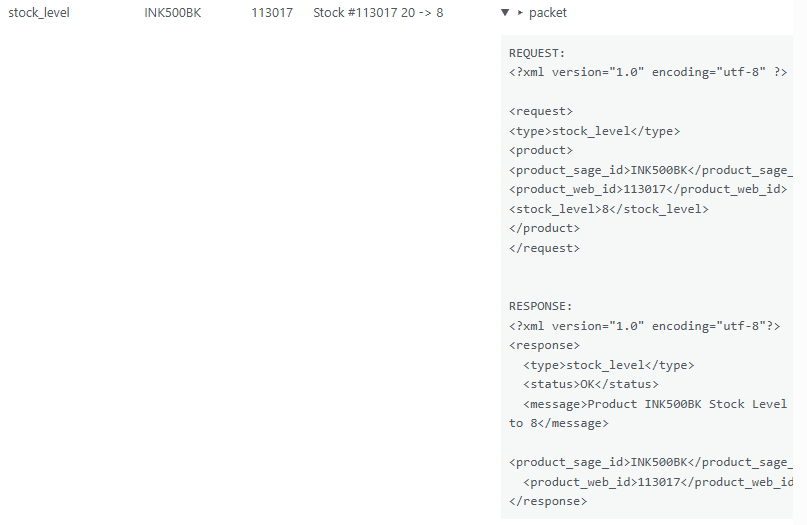
Every request from Sage, what the shop did with it, and the full message behind each line.
PRO Plugin
Pro: orders into Sage, Sage onto your shop
Pro does the rest of what Adept’s interface can do: web orders and new customers into Sage, and prices, VAT, weights and product rules from Sage onto your shop. Then it tells you when something needs a look.
[Slider or screenshots: Status tab, Mappings tab, Rules tab, Issues tab, an order showing its Sage order number]

Orders into Sage
Every Processing order goes into Sage once: customer, invoice and delivery addresses, lines, carriage, and discounts as a proper Sage Net Value Discount. The Sage order number comes back onto the order.

New customers into Sage
New web customers become Sage accounts, with postcode-style account refs or refs allocated by Adept. Guest orders go to the account you choose.

Prices from Sage
Sage’s sales price and any number of price lists, each sent to the regular price, the sale price or a field of your own, such as a trade price. A zero price is never applied.

Product rules
Tell it what your Sage web codes mean: A publishes, B publishes and shows Only available whilst stocks last, C hides and ignores stock. Your codes, your rules.

Issues, not guesswork
Stock codes Sage knows but the shop doesn’t, zero weights, VAT rates with no tax class: grouped, explained, exportable, and ticked off when fixed.

Know when it stops
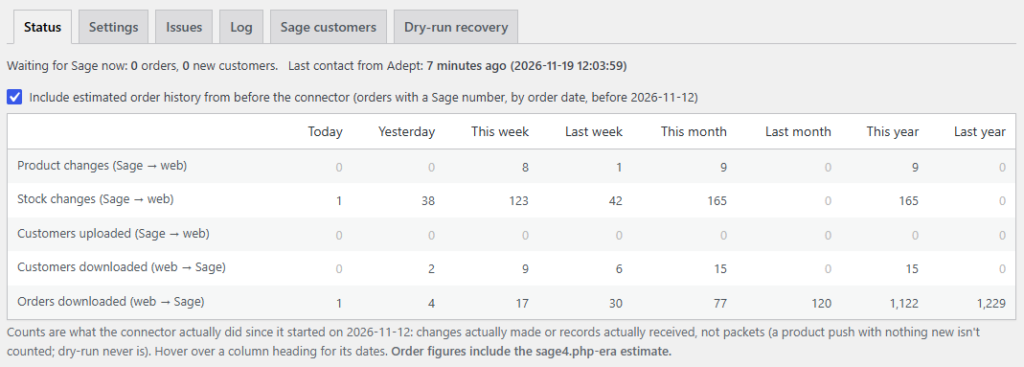
An email if orders stop reaching Sage, quiet overnight while Sage is closed. A status grid shows what moved today, this week, this year.

VAT and weights
Sage VAT rates mapped to your WooCommerce tax classes, and unit weights onto your products for shipping.

Check your customers
Let Sage send its customer list and see, field by field, where it disagrees with your website. Read-only: your customers are never changed.

Fits what you have
Sage order number on every order and in the orders list, web codes on products and variations. Moving from another integration? Keep its data.
Worked Example
How a discounted web order lands in Sage, to the penny
(Illustrative: made-up shop, made-up order, the real calculation.)
- Goods: £240.00 including VAT (£200.00 + £40.00 VAT)
- Automatic discount: 10% off orders over £200, so £24.00 off (£20.00 + £4.00 VAT)
- Delivery: £7.20 (£6.00 + £1.20 VAT)
- Customer pays: £223.20
The usual problem: send the lines at their discounted prices and the invoice no longer shows what things cost; send them at full price and forget the discount, and Sage’s invoice says £247.20 when the customer paid £223.20.
What Pro sends: the lines at their full £200.00 + £40.00 VAT, delivery at £6.00 + £1.20, and the discount as one Sage Net Value Discount of £20.00, the way Adept recommends. Sage’s invoice comes to £186.00 + £37.20 VAT = £223.20: exactly what the customer paid, with the discount shown on its own line.
And back on the website: the order gets its Sage order number, shown on the order and in your orders list, so it’s never sent twice.
It works the same whether the discount is a coupon or an automatic rule, and the description on the invoice names the coupon.
Pricing
Free vs Pro
Start with stock for free. Add Pro when you’re ready to stop typing web orders into Sage.
Comparison table
| Free | Pro | |
|---|---|---|
| Stock levels from Sage, matched by SKU | ✓ | ✓ |
| Stock status and backorders handled by WooCommerce | ✓ | ✓ |
| Access key, IP allowlist and dry-run | ✓ | ✓ |
| Request log with full messages | ✓ | ✓ |
| Web orders into Sage, discounts as a Net Value Discount | ✓ | |
| New customer accounts into Sage | ✓ | |
| Prices and price lists from Sage | ✓ | |
| VAT classes and weights from Sage | ✓ | |
| Web code rules and customer notices | ✓ | |
| Product hide requests (made private, never deleted) | ✓ | |
| Issues tab, CSV export and dealt-with tracking | ✓ | |
| Status grid and stalled-order email alerts | ✓ | |
| Sage customer check (read-only) | ✓ | |
| Email support | ✓ |
Pricing
| Plan | Sites | Price per year |
|---|---|---|
| Single site | 1 | $129 |
| Small agency | 5 | $399 |
| Agency | 20 | $999 |
Prices include updates and support for a year.
Each licence runs for a year, in step with Adept’s own licensing. Renew to keep orders flowing; stock levels carry on with the free plugin.
14-day money-back guarantee. Secure checkout by Freemius; VAT handled for you.
FAQ
Sage 50 Accounts, a licensed copy of Adept’s Line 50 web interface client on the PC that runs Sage, and WooCommerce with SKUs that match your Sage stock codes. Pro is an add-on, so install the free plugin first.
No. It’s an independent plugin, built by a UK developer who runs Adept’s interface on a real client’s WooCommerce shop. You buy Adept’s client from Adept; this is the website end of it.
No. Products are matched by SKU and are never created from Sage. When Sage asks for a product to be deleted, it’s made private instead, so order history and links survive.
Pro sends new web orders and new customer accounts, and Sage’s client loads them. It never edits existing Sage records. Customer data sent from Sage is only compared with your website, never written to it.
Not in normal use. Each order is marked with its Sage order number as soon as Sage confirms it, and only unmarked orders are sent. If Sage rejects an order, it’s held back for a while and listed on the Issues tab, rather than sent again in a loop.
Yes. Add &dry=1 to the address and nothing is changed on the website; every change it would have made is logged. Stock and product tests are completely safe. For orders, use Adept’s test tool, because the real client still loads orders into Sage.
Yes. Pro can read the fields your previous integration used for Sage order numbers, account refs and web codes, so orders it already sent aren’t sent again.
Yes. Each variation is matched by its own SKU, and both WooCommerce order storage types (HPOS and the older posts tables) are supported.
Pro stops sending orders and customers to Sage and applying Sage prices and rules until the licence is renewed, while stock levels keep updating through the free plugin.
Usually not. Staging, development and local copies don’t count towards your site limit when their address shows what they are, such as staging.yourshop.co.uk or yourshop.local. If yours isn’t picked up, email and we’ll sort it.
The free plugin shows you how the connection works with your own Sage data. If Pro isn’t right for your shop, email within 14 days for a full refund.
Stop typing web orders into Sage.
Start with stock levels for free in ten minutes. Add Pro when you want orders, customers and prices flowing too.
Sage and Sage 50 are trademarks of The Sage Group plc. Adept is a trademark of Adept Computer Support Ltd. WooCommerce is a trademark of Automattic Inc. Tivy Connector for Sage 50 and Adept Tools XML is an independent plugin and is not affiliated with or endorsed by Sage, Adept, WooCommerce or Automattic.